Example · 01
Dropping in a container
A forward simulation using implicit Euler integrator. Involves collision between deformable and affine bodies. This example serves as a crash course on how to use YASPS to build the meshes, primitives, attributes, and how the primitive union can be used to assemble collision primitives.
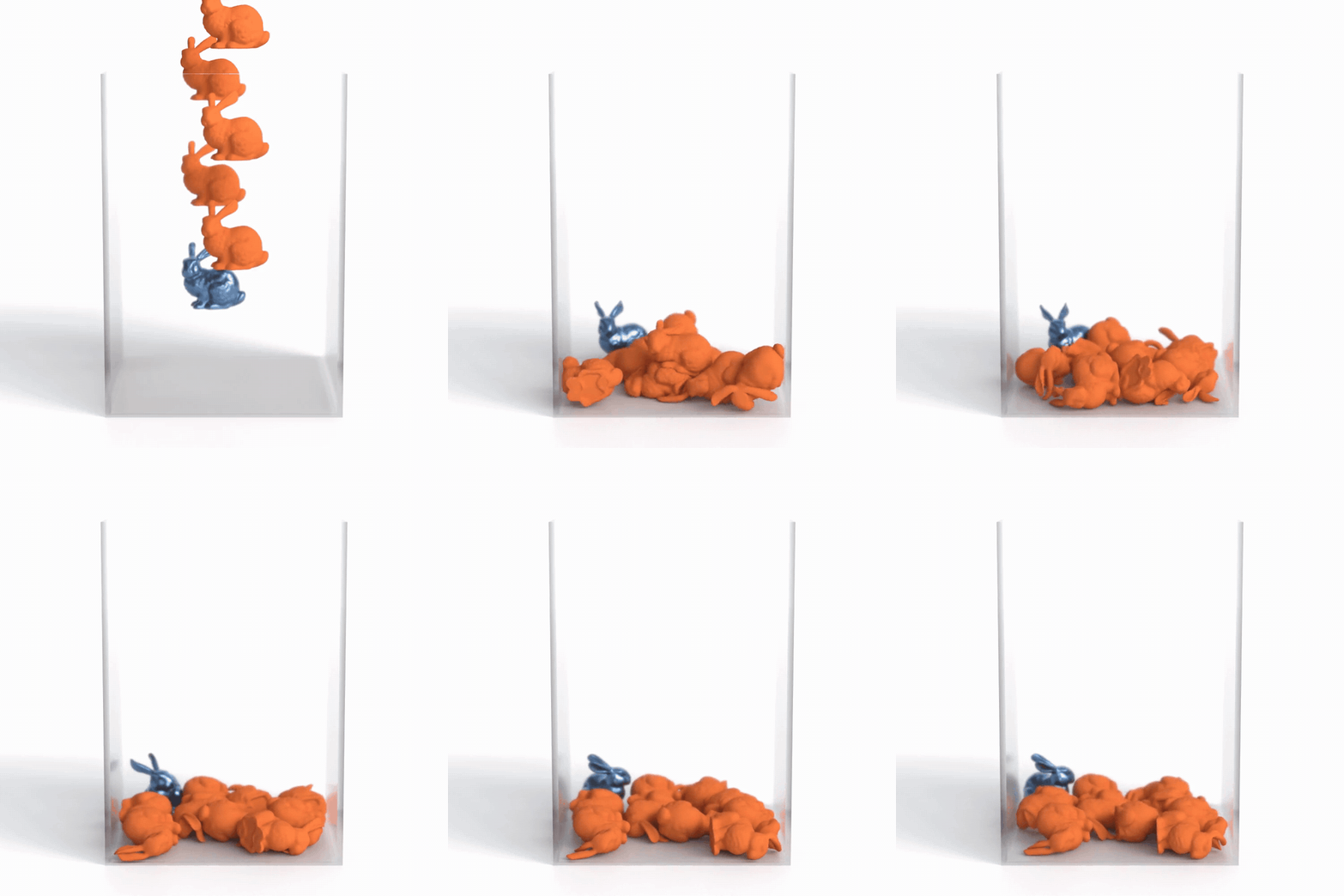
This tutorial follows the structure of YASPS’s dropping_in_container_mixed_separation example. It omits rendering and timing code so the simulation structure stays visible.
Imports
Let’s first start by importing some necessary libraries, namely yasps.scene and ccd.CCD. The ccd library lives under the example folder when you first download YASPS.
import sys
from yasps import scene
sys.path.append('../ccd')  # or an absolute path
from ccd import CCD
Create the scene
We can now create the scene by:
simulation = scene("mixed_drop")
Additionally, we will also create some scene constants.
DT = 0.01
DHAT = 1e-6
KAPPA = 10_000.0
MU = 3_760.0
LAMBDA = 8_480.0

dt = simulation.addConstant("dt")
dhat = simulation.addConstant("dhat")
kappa = simulation.addConstant("kappa")
dt.updateValue(DT)
dhat.updateValue(DHAT)
kappa.updateValue(KAPPA)
Create some soft bunnies
We first create a mesh object:
soft_bunnies = simulation.addMesh("soft_bunnies")
We can now add the vertices primitive:
soft_bunny_vertices = soft_bunnies.addPrimitive("vertices", numInstances=NUM_SOFT_BUNNIES * NUM_VERTICES_PER_BUNNY)
Now that we know the number of vertices, we need to give the vertices some attributes:
soft_bunnies_vertices_position = soft_bunny_vertices.addAttribute("position", rows=3, cols=1)
soft_bunnies_vertices_rest_position = soft_bunny_vertices.addConstant("rest_position", rows=3, cols=1)
soft_bunnies_vertices_last_position = soft_bunny_vertices.addConstant("last_position", rows=3, cols=1)
soft_bunnies_vertices_velocity = soft_bunny_vertices.addConstant("velocity", rows=3, cols=1)
Note that we use addConstant to define the rest_position, last_position, and velocity attributes. This is a strong indicator to inform YASPS that those attributes are not supposed to be differentiated in our forward simulation unless explicitly requested.
On the contrary, we use addAttribute to define the position attribute. This means if a computation involves the position attribute is differentiated, YASPS will automatically compute the differentiation against the position attribute regardless if it is a differentiation target. However, if it is not a differentiation target, YASPS will not accumulate the Hessian and gradient.
This looks like a redundant design, but it exists for the SPD projection (projecting a local matrix to positive semi-definite by perturbing the Eigenvalues) to perform desired results. For example, if we want to do projection on a 4x4 matrix, where one of the row is an attribute who is not a differentiation target, then doing the projection on the 4x4 matrix then ommiting the extra row and column gives different result from projecting the already omitted 3x3 matrix.
After the attributes are set, we can then update the values:
soft_bunnies_vertices_position.updateValue(BUNNY_REST_POSITIONS)
soft_bunnies_vertices_rest_position.updateValue(...)
...
Create bunny tetrahedron
Now that we have the bunny vertices, we can create the tetrahedrons (assuming we have a tet mesh)
The first thing to do is to create the tetrahedron primitive:
soft_bunnies_tetrahedron = soft_bunnies.addPrimitive("tetrahedron", numInstances=NUM_SOFT_BUNNIES * NUM_TETS_PER_BUNNY)
Then, we create a connectivity from the tetrahedron primitive to the bunny vertices:
soft_t2v = soft_bunnies_tetrahedron.addConnectivity("soft_t2v", soft_bunny_vertices, SOFT_BUNNY_TET_INDICES, 4)
And finally, we can symbolically define the tetrahedron’s position as:
soft_bunnies_tetrahedron_position = soft_bunnies_tetrahedron.addAttribute("position", through=soft_t2v, source=soft_bunnies_vertices_position)
This creates a 4 by 3 per-instance attribute for the tetrahedron’s position.
Create some affine-body bunnies
In similar fashion, we can create affine-body bunnies by adding a vertex primitive, a tet primitive. However, this time, the position of the vertices directly depends on the affine bodies. So this time, we also create the affine body primitive:
affine_bunnies = simulation.addMesh("affine_bunnies")
affine_bodies = affine_bunnies.addPrimitive("affine_body", numInstances=NUM_AFFINE_BUNNIES)
affine_bodies_affine_matrices = affine_bodies.addAttribute("affine_matrix", rows=3, cols=3)
affine_bodies_translations = affine_bodies.addAttribute("translation", rows=3, cols=1)
Now, we know that to compute the current position of a vertex on the affine body, we need its rest position of the vertices:
affine_bunnies_vertices = affine_bunnies.addPrimitive("vertices", numInstances=NUM_AFFINE_BUNNIES)
affine_bunnies_vertices_rest_positions = affine_bunnies_vertices.addAttribute("rest_position", rows=3, cols=1)
And we need the actual affine matrices and translations. To do this, we first create a connectivity between vertices and affine bodies. This will inform us which vertices connects to which affine bodies:
abd2v = affine_bunnies_vertices.addConnectivity("abd2v", affine_bodies, AFFINE_BODIES_CONNECTIVITY, 1)
Here, 1 means that each vertex is connected to exactly one affine body.
And now we need to pull the affine matrix and translation from the affine bodies:
affine_bunnies_vertices_affine_matrix = affine_bunnies_vertices.addAttribute("affine_matrix", through=abd2v, source=affine_bodies_affine_matrices)
affine_bunnies_vertices_affine_matrix = affine_bunnies_vertices_affine_matrix.resize(3, 3)
affine_bunnies_vertices_translation = affine_bunnies_vertices.addAttribute("translation", through=abd2v, source=affine_bodies_translations)
affine_bunnies_vertices_translation = affine_bunnies_vertices_translation.resize(3, 1)
Finally, we can compute the position of each vertex by:
affine_bunnies_vertices_position = affine_bunnies_vertices_affine_matrix * affine_bunnies_vertices_rest_positions + affine_bunnies_vertices_translation
affine_bunnies_vertices_position = affine_bunnies_vertices.addAttribute("position", computed_attribute = affine_bunnies_vertices_position)
And in similar fashion, we can create the tetrahedron and their attributes on the affine bunnies.
Add the collision mesh
Because everything is treated as mesh and primitives, the collision pairs are naturally some primitives under some mesh. So we create that mesh first:
collision_mesh = simulation.addMesh("collision")
Then since we know the collision pairs are constructed on some vertices positions, where the vertices can be from the soft bunnies, the affine bunnies, or the container (whose construction we will omit in this example), we will create a primitive union:
collision_vertices = collision_mesh.addPrimitiveUnion("vertices", [soft_bunnies_vertices, affine_bunnies_vertices, container_vertices])
And if since we care about its vertices, we can add the attribute:
collision_position = collision_vertices.addAttribute("position")
Note that this attribute construction only takes in a name. This is because the attribute with the same name already exists under the three primitives we just unioned, and they all have the same per-instance dimension 3x1.
Now we can add new primitives under this mesh for different types of collision pairs. In this example we will only show the construction of point-point collision pairs:
pp = collision_mesh.addPrimitive("point_point", numInstances=0, isDynamic=True)
pp2v = pp.addConnectivity("pp_pairs_to_vertices", collision_vertices, [], 2)
pp_position = pp.addAttribute("position", through=pp2v, source=collision_position)
As you can see, the construction is largely similar to how we do other types of primitives. The only difference is that we mark pp’s construction with isDynamic=True so that we know its number of instances will change over time, and the connectivity pp2v is also dynamic.
Write your first energy
Let’s start by writing an inertia energy:
from yasps import attribute
def inertia(last_position, velocity, dt, position, mass):
  gravity_step = attribute.to_array([0.0, 9.8 * dt * dt, 0.0], rows=3, cols=1)
  target = last_position + velocity * dt - gravity_step
  displacement = position - target
  return 0.5 * displacement.transpose() * mass * displacement
inertia_term = inertia(soft_bunnies_vertices_last_position, soft_bunnies_vertices_velocity, dt, soft_bunnies_vertices_position, soft_bunnies_vertices_mass)
inertia_term = soft_bunnies_vertices.addAttribute("inertia", computed_attribute = inertia_term)
The inertia_term is now an attribute that stores the entire computation tree. We can then register this attribute as an energy term:
simulation.addEnergy(inertia_term, projection_method=-1)
In the same way, we can register many other energies under this scene:
simulation.addEnergy(stable_neo_hookean, projection_method=1)
simulation.addEnergy(pp_collision_energy, dynamic_instances=True, projection_method=1, separate_hessian_jacobian = True)
And finally we can inform our differentiator what attributes to differentiate with respect to:
simulation.addMinimizeTarget([soft_bunnies_vertices_position, affine_bodies_affine_matrices, affine_bodies_translations])
Initialize CCD
YASPS knows how attributes and primitives are connected, but the CCD wrapper also needs the surface triangles and edges. Their indices must use the same global order as collision_vertices: soft bunny vertices first, affine bunny vertices second, and container vertices last. This is to ensure that when we update the connectivity, the indexing remains consistent between CCD and how we constructed the primitive union.
import numpy as np
import pycuda.gpuarray as gpuarray

triangle_indices_all = np.asarray([...], dtype=np.uint32).reshape((-1, 3))
edge_indices_all = np.asarray([...], dtype=np.uint32).reshape((-1, 2))
surface_indices_all = np.asarray([...], dtype=np.uint32).reshape(-1)

# One entry for every vertex in collision_vertices.
mesh_indices = np.asarray([...], dtype=np.uint32).reshape(-1)
mesh_indices controls self-collision. Vertices labeled 0 may collide with vertices from the same mesh. A shared nonzero label suppresses pairs whose primitive vertices all have that label.
Now create the CCD object and initialize its face and edge acceleration structures:
num_surface_vertices = len(surface_indices_all)
num_total_vertices = collision_vertices.numInstances

ccd = CCD(num_surface_vertices, num_total_vertices, max_ccd_pairs=100_000_000, mesh_indices=mesh_indices)

surface_indices_gpu = gpuarray.to_gpu(surface_indices_all)
triangle_indices_gpu = gpuarray.to_gpu(triangle_indices_all.reshape(-1))
edge_indices_gpu = gpuarray.to_gpu(edge_indices_all.reshape(-1))
initial_collision_position = collision_position.compute().value.copy()

ccd.init_faces(initial_collision_position, triangle_indices_gpu, surface_indices_gpu, len(triangle_indices_all))
ccd.init_edges(initial_collision_position, initial_collision_position, edge_indices_gpu, len(edge_indices_all))
DHAT is a squared distance in this CCD wrapper. It is both the collision barrier distance used by the energies and the distance passed to collision detection.
Move the simulation forward
We now have everything set up for a forward simulation loop. We will now demonstrate how we perform one step of implicit Euler integration.
We start by computing the update direction by solving the linear system Hx = g, where H is the Hessian matrix and g is the gradient. (Note that normally we solve for Hx = -g, so once we get the result we will need to invert it for the actual step)
directions = simulation.minimizeEnergy(tolerance=1e-4)
d_soft_vertices_position = directions[0]
d_affine_matrices = directions[1]
d_translations = directions[2]
Note that once we call simulation.minimizeEnergy(), it returns a list of gpu arrays. The order is the same as the ones we set in simulation.addMinimizeTarget().
Now, we need to save some values before updating them:
soft_before = soft_bunnies_vertices_position.value.copy()
affine_before = affine_bodies_affine_matrices.value.copy()
translation_before = affine_bodies_translations.value.copy()
positions_before = collision_position.compute().value.copy()
Note the .compute() is invoked on collision_position to actually generate a compiled kernel to compute the value. This is because collision_position is an attribute that is not a data or constant attribute. Its value is not user supported.
Additionally, we will also compute the total energy before the update:
energy_before = simulation.computeTotalEnergy()
This will be used later on for the backtracking step.
Now we first take the full step:
soft_bunnies_vertices_position.updateValue(
  soft_before - d_soft_position, deepCopy=True
)
affine_bodies_affine_matrices.updateValue(
  affine_before - d_affine_matrix, deepCopy=True
)
affine_bodies_translations.updateValue(
  translation_before - d_translation, deepCopy=True
)
We then compute the actual direction produced by this full step:
full_motion = positions_before - collision_position.compute().value
Note that we are invoking .compute() on collision_position again. This is because collision_position depends on the value of the soft bunny vertices position, as well as the affine bodies. Updating those values will invalidate the cached value of collision_position, so we need to recompute it.
Now we will consult our CCD to see how large of a step we can actually take before entering a penetration state.
ccd.ccd(positions_before, DHAT, full_motion, 1.0)
largest_step = ccd.compute_largest_step_size(0.5, positions_before, full_motion)
First call ccd.ccd with the old positions and the full motion. This builds a swept candidate set. We then ask for the largest collision-safe fraction of the Newton update
The first argument to compute_largest_step_size is its slackness. 0.5 deliberately stays away from the first detected impact.
Backtrack with substeps
While the largest safe step tells us how much we can safely move, to help convergence we need to make sure a step we take actually decreases the energy. This is done by backtracking with substeps.
for substep in range(8):
  soft_bunnies_vertices_position.updateValue(
    soft_before - step * d_soft_position, deepCopy=True
  )
  affine_bodies_affine_matrices.updateValue(
    affine_before - step * d_affine_matrix, deepCopy=True
  )
  affine_bodies_translations.updateValue(
    translation_before - step * d_translation, deepCopy=True
  )

  trial_positions = collision_position.compute().value

  # we check for close collision pairs, so we can
  # update the collision primitives
  ccd.cd(trial_positions, DHAT)
  update_collision_primitives()

  if simulation.computeTotalEnergy() <= energy_before:
    return
  step *= 0.5
Here, update_collision_primitives() is called to update the collision primitives based on the CCD results. The definition is shown below:
def update_collision_primitives():
  pp_count, pe_count, pt_count, ee_count = ccd.separated_counts

  pp.updateNumInstances(pp_count)
  pe.updateNumInstances(pe_count)
  pt.updateNumInstances(pt_count)
  ee.updateNumInstances(ee_count)

  if pp_count:
    pp2v.updateConnectivity(ccd.pp[:2 * pp_count])
  if pe_count:
    pe2v.updateConnectivity(ccd.pe[:3 * pe_count])
  if pt_count:
    pt2v.updateConnectivity(ccd.pt[:4 * pt_count])
  if ee_count:
    ee2v.updateConnectivity(ccd.ee[:4 * ee_count])
The backtrack takes 8 steps, halving the step size each time until the energy decreases or the step size becomes too small.
Set convergence criteria
Ideally, the Newton’s method should converge when gradient = 0, meaning that the energy is minimized. But in reality we may not reach this point. So we set a convergence tolerance instead.
if max(abs(full_motion)).get() / DT < 0.01:
  break # we say this is a converged state
Update values
After the convergence is reached, we will need to update some values, for example, the last positions of the vertices will be updated to the position value at the beginning of the frame, the velocity of the vertices needs to be recomputed and updated:
soft_bunnies_vertices_last_position.updateValue(soft_before, deepCopy=True)
soft_velocity = (
  soft_bunnies_vertices_position.value
  - soft_bunnies_vertices_last_position.value
) / DT
soft_bunnies_vertices_velocity.updateValue(soft_velocity, deepCopy=True)
...
And that’s basically how you write the update loop within one frame. For continuous frames, you just need to put a for loop around the code blocks we shown before.